
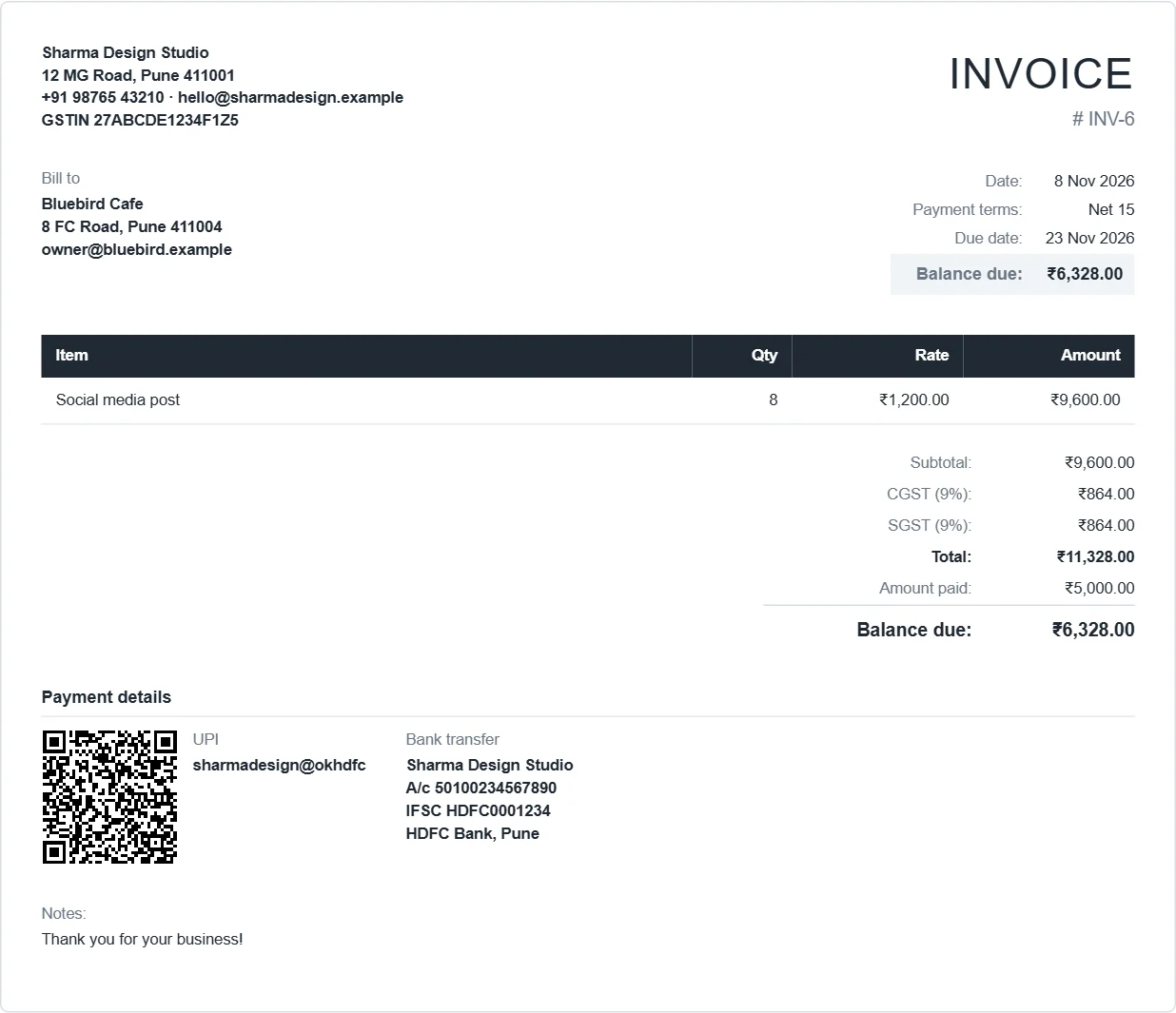
How to make a GST invoice in InvoiceDesk
- Open the app. In Settings, type your business name, address and GSTIN in the From box, set the tax name to GST and your usual rate, and upload your logo.
- Click New invoice. Change the title to TAX INVOICE if you like. Numbers go up by themselves (INV-1, INV-2 …), and you can set your own prefix such as
2026-27/. - Pick or add the customer. Add their GSTIN to the customer and it prints under Bill to. For a different delivery address, fill Ship to.
- Add each line: description, quantity and rate. Put the HSN or SAC code in the description, for example
Logo design (SAC 998391). - Tick GST and enter the rate. For a sale inside your own state, tick Show as CGST + SGST and the tax prints as two equal halves. For a sale to another state, rename the tax to IGST.
- Choose the payment methods to print (UPI QR, bank transfer) and click Download PDF.
What it puts on the invoice
- Your name, address and GSTIN, with your logo
- A unique invoice number and the date of issue
- The customer's name, address and GSTIN, and a separate delivery address
- Each item with quantity, rate and amount, plus discount and shipping
- Taxable value, then CGST and SGST (or IGST) with the rate and the amount
- Total, amount paid and balance due, in rupees with Indian digit grouping (₹1,10,580.00)
- A UPI QR code for the exact balance, and your bank account and IFSC
The full list of what the law asks for is in our guide to the GST invoice format.
What it does not do (yet)
We'd rather tell you now than have you find out later:
- One tax rate per invoice. If one invoice has items at 5% and 18%, make two invoices or work out the tax as a flat amount.
- No HSN column. Put the code in the item description, as shown above.
- No e-invoice (IRN). Businesses that must issue e-invoices on the government portal still need to do that. InvoiceDesk is a good fit for freelancers and small businesses below that limit.
- No GST returns. Use the CSV export to hand your numbers to your accountant.
Why a browser invoice generator
Most free GST billing tools ask you to make an account first, then keep your customer list on their servers. InvoiceDesk works the other way round. It runs in your browser and saves to your device, so your business data never leaves it. If you'd rather keep a copy on your own website, you can install InvoiceDesk free.